반응형
Material-UI: A popular React UI framework
React components for faster and easier web development. Build your own design system, or start with Material Design.
material-ui.com
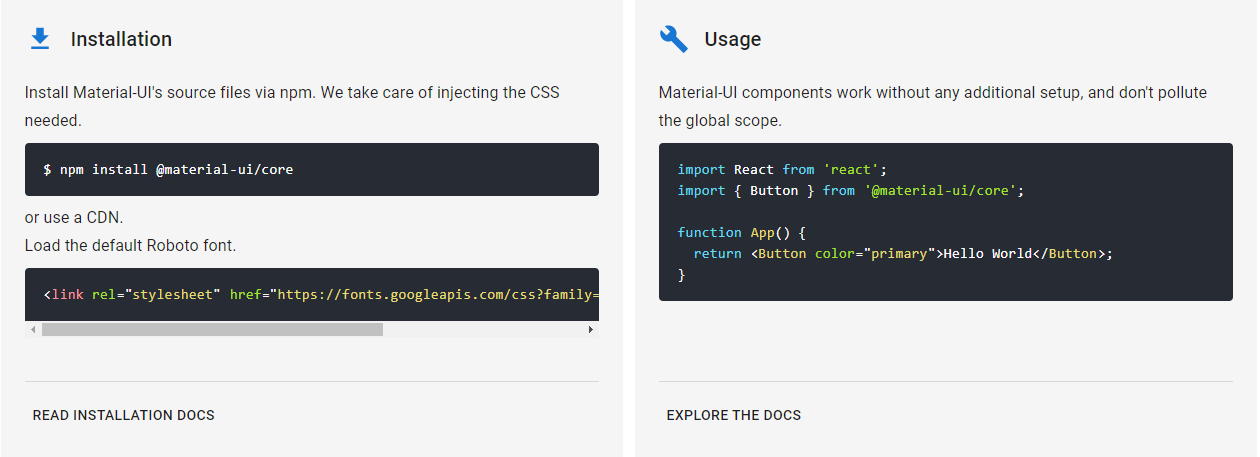
Material-UI는 react와 많이 활용되는 디자인 프레임워크입니다.
다운로드는 npm을 통해 다운로드할 수 있습니다.

이제 콘솔창에서 yarn start대신 vsc 터미널에서 React를 실행 중 문제가 발생했다.

이의 대한 오류 해결은 관리자 권한으로 powershell을 실행을 하지 않았기 때문이다.
PS C:\Users\Desktop\react\management> ExecutionPolicy
Restricted

-> 모든 스크립트가 제한중


PS C:\Users\Desktop\react\management> Set-ExecutionPolicy -Scope CurrentUser
->  스코프 설정
cmdlet Set-ExecutionPolicy(명령 파이프라인 위치 1)
다음 매개 변수에 대한 값을 제공하십시오.


ExecutionPolicy: Unrestricted

--> 제한해제
PS C:\Users\Desktop\react\management> ExecutionPolicy
Unrestricted

--> 현상태
문제 해결
import Table from  '@material-ui/core/Table';
import TableHead from  '@material-ui/core/TableHead';
import TableBody from  '@material-ui/core/TableBody';
import TableRow from '@material-ui/core/TableRow';
import TableCell from '@material-ui/core/TableCell';
TABLE에 적용시킬 것이므로 import를 해줍니다.
import React from 'react';
import TableRow from '@material-ui/core/TableRow';
import TableCell from '@material-ui/core/TableCell';

class Customer extends React.Component{

    render(){

        return(
            <TableRow>
                <TableCell>{this.props.id}</TableCell>
                <TableCell><img src={this.props.image} alt="profile"/></TableCell>
                <TableCell>{this.props.name}</TableCell>
                <TableCell>{this.props.bithday}</TableCell>
                <TableCell>{this.props.gender}</TableCell>
                <TableCell>{this.props.job}</TableCell>
            </TableRow>
        );
    }

}


   export default Customer;
태그를 통해 각 테이블에 대한 속성을 정의하고 그 안에 값들을 넣어줍니다.
Customer라는 컴포넌트는 App. Component에서 호출되므로 App에서 테이블의 겉 부분을 정의해줍니다.
import React from 'react';
import logo from './logo.svg';
import './App.css';
import Customer from './compnents/Customer'
import Table from  '@material-ui/core/Table';
import TableHead from  '@material-ui/core/TableHead';
import TableBody from  '@material-ui/core/TableBody';
import TableRow from '@material-ui/core/TableRow';
import TableCell from '@material-ui/core/TableCell';


class  App extends React.Component {

  render(){

      return (
        <div>
          <Table>
            <TableHead>
            <TableCell>번호</TableCell>
            <TableCell>이미지</TableCell>
            <TableCell>이름</TableCell>
            <TableCell>생년월일</TableCell>
            <TableCell>성별</TableCell>
            <TableCell>직업</TableCell>
            </TableHead>
            <TableBody>
          {customers.map(c => { return ( <Customer key = {c.id} id = {c.id} image={c.image} name={c.name} birthday={c.birthday} gender={c.gender} job={c.job} />);})}
            </TableBody>
          </Table>
        </div>

            );
          }
}

const customers = [
  {
  'id' : 1,
  'image' : 'https://placeimg.com/64/64/1',
  'name' :"홍길동",
  'birthday' : '951006',
  'gender' : '남자',
  'job' : '학생'

},
{
  'id' : 2,
  'image' : 'https://placeimg.com/64/64/2',
  'name' :"이순신",
  'birthday' : '942006',
  'gender' : '남자',
  'job' : '대장'

},
{
  'id' : 3,
  'image' : 'https://placeimg.com/64/64/3',
  'name' :"을지문덕",
  'birthday' : '913006',
  'gender' : '남자',
  'job' : '시민'

}

]
export default App;
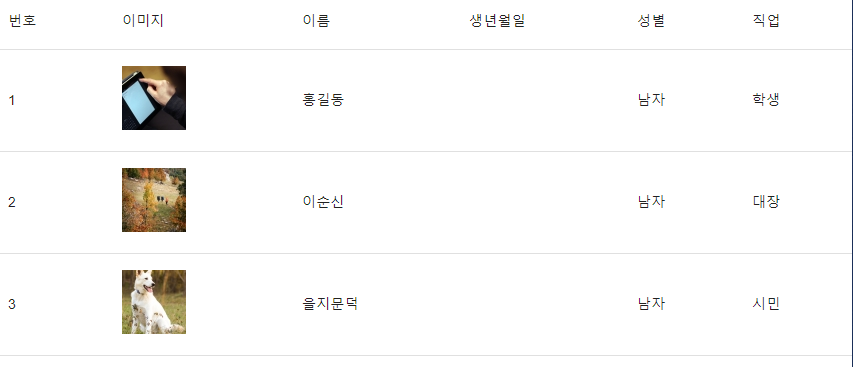
컨포넌트의 외부를 감싸기 위해 사용하는 태그 중 하나
import Paper from './compnents/Customer/Paper';
material-ui를 이용해 css를 적용
import {withStyles} from '@material-ui/core/styles';

const styles = theme => ({

  root : {
    width : '100%',
    marginTop : theme.spacing.unit * 3,
    overflowX : "auto"
  },
  table :{

    minWidth : 1080

  }

})
import React, { Component } from 'react';
import Customer from './compnents/Customer'
import './App.css';

import Paper from  '@material-ui/core/Paper';
import Table from  '@material-ui/core/Table';
import TableHead from  '@material-ui/core/TableHead';
import TableBody from  '@material-ui/core/TableBody';
import TableRow from '@material-ui/core/TableRow';
import TableCell from '@material-ui/core/TableCell';
import { withStyles } from '@material-ui/core/styles';

const styles = theme => ({

  root : {
    width : '100%',
    marginTop : theme.spacing.unit * 3,
    overflowX : "auto"
  },
  table :{

    minWidth : 1080

  }

})


const customers = [
  {
  'id' : 1,
  'image' : 'https://placeimg.com/64/64/1',
  'name' :"홍길동",
  'birthday' : '951006',
  'gender' : '남자',
  'job' : '학생'

},
{
  'id' : 2,
  'image' : 'https://placeimg.com/64/64/2',
  'name' :"이순신",
  'birthday' : '942006',
  'gender' : '남자',
  'job' : '대장'

},
{
  'id' : 3,
  'image' : 'https://placeimg.com/64/64/3',
  'name' :"을지문덕",
  'birthday' : '913006',
  'gender' : '남자',
  'job' : '시민'

}

]

class  App extends React.Component {

  render(){
    const {classes} = this.props;
      return (
        <Paper className={classes.root}>
          <Table className={classes.table}>
            <TableHead>
              <TableRow>
            <TableCell>번호</TableCell>
            <TableCell>이미지</TableCell>
            <TableCell>이름</TableCell>
            <TableCell>생년월일</TableCell>
            <TableCell>성별</TableCell>
            <TableCell>직업</TableCell>
              </TableRow>
            </TableHead>
            <TableBody>
          {customers.map(c => { return ( <Customer key = {c.id} id = {c.id} image={c.image} name={c.name} birthday={c.birthday} gender={c.gender} job={c.job} />);})}
            </TableBody>
          </Table>
        </Paper>

            );
          }
}
export default withStyles(styles)(App);
withStyles을 적용시킨후 export
https://material-ui.com/components/tables/#table
Table React component - Material-UI
Tables display sets of data. They can be fully customized.
material-ui.com
참고를 해서 ui를 꾸밀 수 있습니다.
반응형
'FrontEnd > React' 카테고리의 다른 글
| MySQL DB 구축 (0) | 2020.07.13 |
|---|---|
| React의 라이프사이클 , API 로딩처리 (0) | 2020.07.12 |
| Window에서 리액트와 Node.js서버 실행시키기 (1) | 2020.07.11 |
| Node.js express (0) | 2020.07.10 |
| Create React App (0) | 2020.07.09 |


댓글